
The short version
- To check your vocal pitch online, press Start singing, allow the mic and sing a steady “ooh”. You’ll see the note, how many cents sharp or flat you are, and a live line on a piano-roll graph.
- Green is in tune, amber is close, red is off. A minus number means flat (too low), plus means sharp (too high). A cent is 1/100 of a semitone.
- Within about 25 cents sounds in tune to most people on a held note. Within 10 is very accurate.
- Five drills built in: hold a note, a five-note warm-up, a major scale, interval jumps and a random-note ear test, each with a reference tone and a score out of 100.
- Private by design. Your voice is analysed on your device and never recorded or uploaded.
How to use the pitch monitor
- Press Start singing and allow the microphone. Laptop and phone mics are fine. Sit about an arm’s length away; singing right into it is like shouting into someone’s ear.
- Pick Lower or Higher voice. It just sets sensible starting notes for the drills (C3 or C4). The graph follows you either way.
- Sing a steady vowel. “Ooh” and “ahh” read best. Consonants, breaths and whispers have no pitch, so the line just pauses. That’s not a bug, that’s physics.
- Watch the colour, not just the note name. Landing on the right note but 30 cents flat is the sneaky one. The gauge shows it at a glance.
- Try a drill. Choose a mode, press Start exercise, listen to the reference note, and hold inside the yellow band until the bar fills. Next note, ding, repeat.
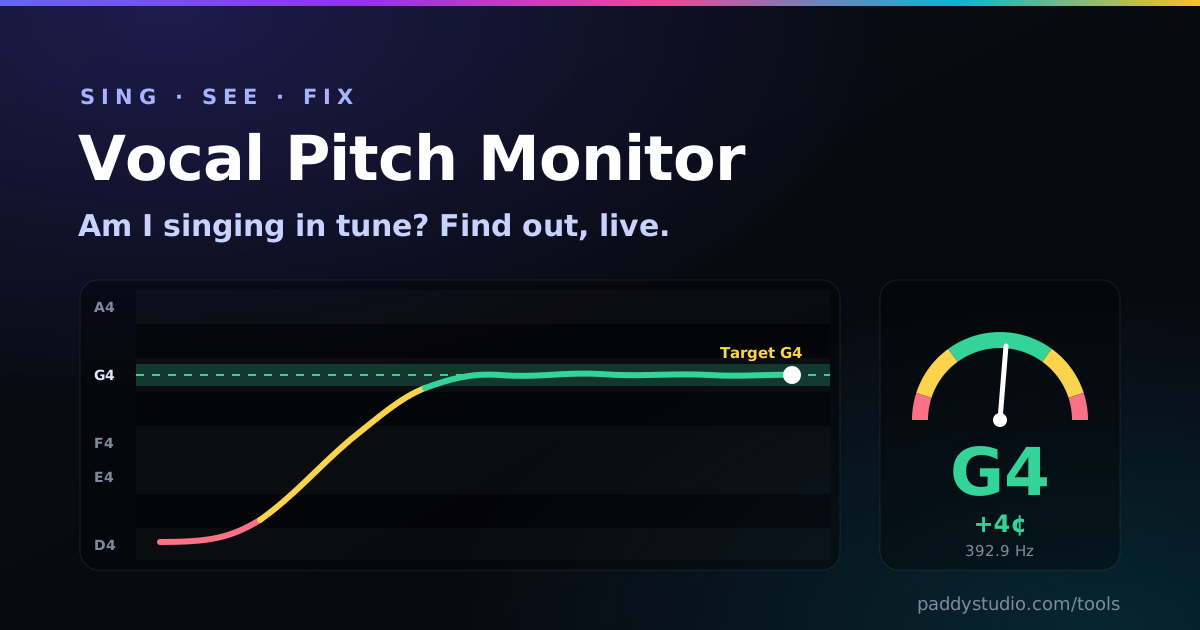
How to read your pitch graph
Time runs left to right (the last nine seconds), pitch runs bottom to top, and every row is one semitone, labelled with its note. Dark rows are the “black key” notes. Here’s what the shapes usually mean:
| You see | It means | Try |
|---|---|---|
| A flat line in the middle of a row | A clean, held note. Lovely. | Nothing. Smug face optional. |
| A line that starts low and swoops up | Scooping: you land under the note and slide in | Imagine the note before you sing it; start it lighter |
| A line that sags at the end of a note | Running out of breath support | Shorter phrases, a bit more air, keep the volume up to the end |
| An even wave either side of the note | Vibrato. Normal and healthy | Use Relaxed fussiness; judge by the centre of the wave |
| A line sitting on the edge of a row | About 50 cents out: halfway to the next note | Hit Hear it, hum along with it, then sing |
| Big jumps up and down | Noise, a breathy tone or the mic is too close | Back off from the mic, sing an “ooh”, quieter room |
How many cents off is “out of tune”?
A cent is one hundredth of a semitone, so C to C♯ is 100 cents. Ears vary, but as a rule of thumb for a held note:
- 0–10 cents: very accurate. Studio-session territory.
- 10–25 cents: sounds in tune to almost everyone. This is the Normal setting.
- 25–40 cents: a trained ear notices, especially against a piano or a harmony.
- 50 cents: exactly between two notes. Everyone notices. Even the cat.
Start on Relaxed if you’re new, move to Normal once you’re scoring over 70, and save Strict for when you fancy being humbled.
The five ear-training drills (and what each one fixes)
- Hold one note for 3 seconds: pick a comfortable note and keep it in the band. Trains steadiness and breath support, the foundation of everything else.
- Five-note warm-up: do-re-mi-fa-sol and back down. The classic choir warm-up, and the quickest way to wake your ear up before singing.
- Major scale climb: a full octave up and down. Most people go flat on the way down, so watch the last three notes.
- Interval jumps: root to third, fifth and octave and back. Trains you to pitch a note rather than slide to it, which is what melodies actually need.
- Random notes: eight surprise notes. This is the ear test: hear it, then find it. Turn off Play each target for hard mode and use your memory of the last note.
Wear headphones for drills. The monitor ignores its own reference note on purpose, but your laptop speaker still bleeds into the mic and muddies the next reading. One earbud in is plenty.
Why do I sing flat (or sharp)? The usual suspects
After every drill the monitor tells you your drift: whether you lean flat or sharp on average. Here’s the honest cheat sheet I wish someone had given me:
- Flat, especially on long notes: breath support is running out. Take a fuller breath and keep a little air pressure going right to the end.
- Flat when you’re tired or singing quietly: energy drop. Stand up, smile slightly (it lifts the soft palate) and think the note “up”.
- Sharp on high notes: pushing with your throat. Less force, same pitch. Relax the jaw.
- All over the place in a loud room: you can’t hear yourself. Cup a hand behind one ear (singers do this for a reason) or practise somewhere quieter.
- Fine on drills, off in songs: normal! Songs move fast. Slow the song right down and hold each note, then speed it back up.
A 10-minute daily routine that actually works
- 2 minutes, free sing: hum and slide gently up and down. Just get the line moving.
- 2 minutes, Hold one note: three comfortable notes, one at a time. Aim for a flat green line.
- 3 minutes, Five-note warm-up: twice on Relaxed, once on Normal.
- 2 minutes, Interval jumps or Random: the ear-stretch bit.
- 1 minute, eyes off the screen: sing the warm-up without looking, then look at the graph afterwards. That’s how the skill moves from your eyes into your ears.
Do that daily and the Practice streak box keeps count. A few minutes a day beats an hour on Sunday, every single time. (Yes, I’m talking to myself here as well.)
Pitch monitor vs vocal range test vs tuner
| Tool | Answers | Use it when |
|---|---|---|
| Vocal pitch monitor (this page) | “Am I in tune, and how am I moving between notes?” | Daily ear training, warm-ups, checking a tricky phrase |
| Vocal range test | “What’s my lowest and highest note, and my voice type?” | Once, then every few months to see progress, or to pick a song key |
| Guitar tuner / microtonal tuner | “Is this one string or note exactly in tune?” | Tuning instruments; the microtonal one for quarter tones and maqam |
From practice to a finished song
Once you know where your voice is happiest, you can write for it. Run the vocal range test to get a comfy key, sketch chords with the chord progression generator, then brief an AI band in the Prompt Studio so the demo sits in your range and you can sing over it. A Suno style hint for a demo in your key looks like this:
warm acoustic pop, key of G major, clean melodic male vocals, mid-range melody, steady 92 bpm, simple chords, intimate
How it works, and what happens to your voice
About 60 times a second, the monitor takes a 40-millisecond slice of your microphone signal and runs the YIN pitch-detection algorithm on it, the same one used by the tuners on this site. YIN looks for how far apart the repeating wiggles in the waveform are, which gives the fundamental frequency even when your voice is full of overtones. A small median filter and an “octave guard” stop the line from leaping an octave when a harmonic briefly shouts louder than the note.
Nothing is recorded, saved or uploaded. Each slice is analysed and thrown away. The only things stored are your settings, best scores and practice streak, in your own browser’s local storage. Close the tab and the mic switches off.
A tool, not a teacher. A pitch monitor is brilliant for ear training, but it can’t see your posture or hear strain. If singing hurts or your voice is hoarse for days, rest it and see a voice teacher or doctor.
Vocal pitch monitor FAQ
How can I check my vocal pitch online for free?
Open this page, press Start singing and allow the microphone. Sing a steady vowel and you’ll see the note, how many cents sharp or flat you are, and a live graph of your pitch. Free, no app, no account, analysed on your device.
What is a vocal pitch monitor?
A tool that detects the pitch of your voice in real time and shows it visually, usually as a moving line on a graph of notes. It lets you see whether you’re hitting, holding and moving between notes accurately, which is surprisingly hard to judge by ear alone.
How many cents off is out of tune for a singer?
Roughly: within 10 cents is very accurate, within 25 sounds in tune to most listeners on a held note, and beyond 40–50 starts to sound clearly off. Vibrato swings further than that either side of the note, and that’s fine.
Why do I sing flat?
Usually breath support running out, tiredness, singing too quietly, a tight throat on high notes, or not hearing yourself in a loud room. More breath on long notes, a reference note and short daily practice fix most of it surprisingly quickly.
Can a pitch monitor improve my singing?
Yes. Instant feedback speeds up ear training a lot. Keep sessions short (5–10 minutes) and finish by singing without looking so your ear does the work. It won’t replace a teacher for technique, breathing or vocal health.
Does it record or upload my voice?
No. Audio is analysed in your browser and thrown away straight after. Nothing is recorded or sent. Only settings, best scores and your streak are stored, in your own browser.
Does it work on a phone?
Yes, in Chrome on Android and Safari on iPhone and iPad. Allow mic access when asked and hold the phone about an arm’s length away.
The line jumps around or doesn’t appear. Help?
Sing a little louder on an “ooh”, move back from the mic, and turn off music or the TV. Whispering, very breathy tones and growls don’t have a clear pitch, so the monitor sensibly shows nothing rather than guessing.
Now find out what you’re working with
The free vocal range test finds your lowest and highest notes, your rough voice type and the song keys that suit you, in about two minutes.
Take the vocal range test →