
The short version
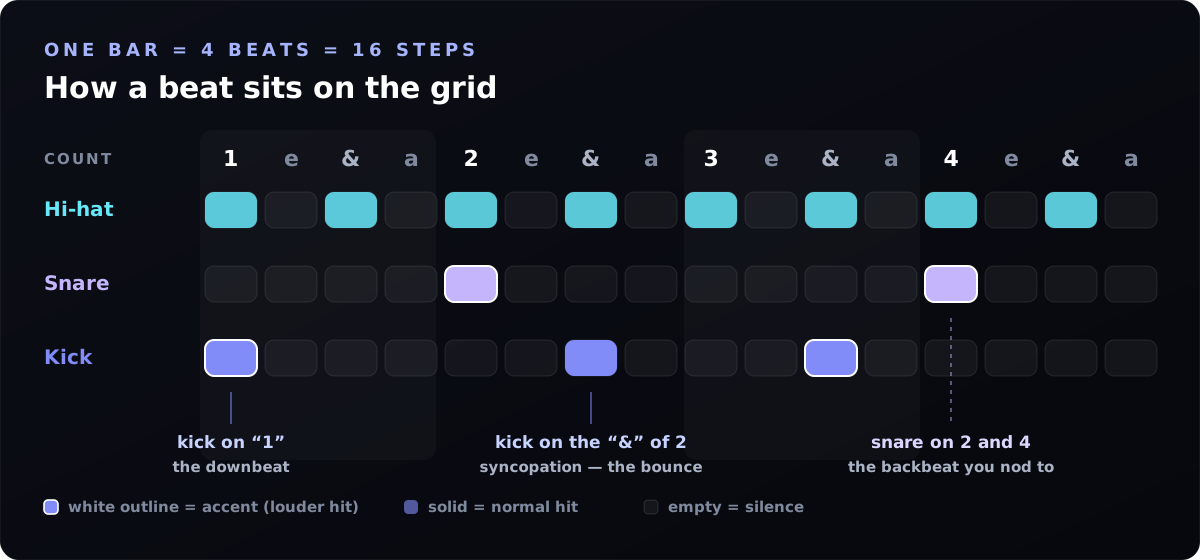
- One bar, 16 steps. Each column is a sixteenth note, counted 1 e & a, 2 e & a, 3 e & a, 4 e & a. Steps 1, 5, 9 and 13 are the four beats.
- The starter beat: kick on steps 1 and 9, snare on 5 and 13, closed hat on every other step. That is pop, rock and dance music.
- Tap twice for an accent. Same drum, louder. Accents are the single biggest thing between a programmed pattern and a played one.
- Swing 15–25% gives boom bap, lo-fi and funk their lean. Leave house and techno straight at 0%.
- Tempo by genre: lo-fi 70–90, hip-hop 85–95, pop 100–115, house 120–128, trap 140 half-time, drill ~142, drum and bass 174.
- It is yours. The drums are synthesised in your browser, not sampled, so the WAV you download carries no sample licence.
How to make a beat online with this beat maker, step by step
The quick version is below. For the long version, with fills, an 8-bar arrangement and the classic mistakes, read my full guide to making a beat online for free.
- Press play on an empty grid and watch the playhead cross the 16 steps. That sweep is one bar, and it loops.
- Kick on step 1. Every beat starts here. Add a second kick on step 9 (beat 3) for a walking pulse, or on 5 and 13 as well for four-on-the-floor.
- Snare on steps 5 and 13. That is the backbeat — beats 2 and 4 — and it is why people nod their heads.
- Hi-hats to fill the gaps. Every other square is eighth notes; every square is driving sixteenths. Tap the ones on the main beats twice so they accent.
- Set the tempo with the slider, or hit Tap tempo four times in time with the song in your head.
- Move one kick off the grid. Drag a kick from beat 3 to step 7 — the “& of 2”. That one move is the difference between a metronome and a groove.
- Add swing last. Nudge it up until the loop stops marching and starts leaning.
- Keep it — download a two-bar WAV for your editor, or copy the beat link to come back to it.
Genre drum patterns and tempos
These are the thirteen patterns in the selector at the top of the page. Notation reads left to right across the bar: X is an accented hit, x a normal hit and – silence. Load one, then change it — a preset is a starting point, not an answer.
| Genre | BPM | Swing | Kick | Snare / clap |
|---|---|---|---|---|
| Boom bap hip-hop | 90 | 20% | X-----x---X----- | ----X-------X--- |
| Trap (half-time) | 140 | 0% | X-----x--X-x---- | --------X------- |
| House | 124 | 0% | X---X---X---X--- | ----X-------X--- |
| Techno | 130 | 0% | X---X---X---X--- | ------------X--- |
| UK drill | 142 | 0% | X--x--X---Xx---- | --------X------- |
| Rock | 120 | 0% | X-------X-x----- | ----X-------X--- |
| Lo-fi chillhop | 78 | 24% | X-----x---X----- | ----x-------x--- |
| Funk breakbeat | 100 | 10% | X--x------X----- | ----X--x----X--- |
| Afrobeats | 105 | 0% | X--x--X---X----- | — |
| Reggaeton (dembow) | 95 | 0% | X-------X------- | ---x--x----x--x- |
| Phonk | 130 | 12% | X-----X---X----- | ----X-------X--- |
| Drum and bass | 174 | 0% | X---------X----- | ----X------X--x- |
| Pop | 105 | 0% | X-------X------- | ----X-------X--- |
Same grid, different song. Load the boom bap pattern and drag the tempo to 170 — it turns into a drum and bass skeleton. Tempo changes a beat more than any single hit does.
What each drum is for
Eight voices is enough for almost any beat, and each one has a job. Tap a drum name in the tool to hear it on its own, or press its number key.
| Drum | Its job | Usually lands on |
|---|---|---|
| Kick | The low pulse you feel in your chest; it defines the groove | Beat 1 always, then wherever the bounce goes |
| Snare | The sharp crack that answers the kick | Beats 2 and 4 (the backbeat), or beat 3 alone for half-time |
| Clap | Widens or replaces the snare in electronic music | Same places as the snare, often layered on top |
| Closed hat | Keeps time and sets the energy level | Every eighth note, or every sixteenth for urgency |
| Open hat | A breath of air that pulls you into the next bar | The last step or two of the bar, or every offbeat in house |
| Rim | Thin percussive click for texture and cowbell-style patterns | Offbeat sixteenths, between the main hits |
| Tom | Tuned drum for fills and tribal patterns | End of a bar, or as a repeating figure in afrobeats |
| Crash | Marks the start of a section | Step 1 of the first bar of a chorus or drop |
Why your beat sounds robotic — and the four fixes
Almost every flat-sounding programmed beat has the same causes, and all four are fixable in under a minute.
- Everything is the same volume. Accent the hits that land on the main beats and leave the in-between hats quiet. On a real kit the drummer's stronger hand is always louder.
- Everything is on a grid line. Put one kick on an “&” or an “a” step. Syncopation is what makes a pattern feel like it is pulling forwards.
- The bar is too full. Delete hits until it feels sparse, then add one back. Space is a drum sound.
- Zero swing on a genre that needs it. Hip-hop, lo-fi, funk and UK garage lean. Push swing to 15–25% and the same squares suddenly sound played rather than printed.
Ghost notes. Add a single quiet snare — one tap, not two — on the step just before the backbeat. It is the trick behind most funk and lo-fi drum loops, and it costs you one square.
How the 16 steps are counted
A bar of 4/4 has four beats, and each beat splits into four sixteenth notes. Drummers count them out loud as “1 e & a, 2 e & a, 3 e & a, 4 e & a”, which maps onto the grid like this:
| Step | Counted | Typically |
|---|---|---|
| 1 | “1” — the downbeat | Kick, and a crash at the top of a section |
| 2, 3, 4 | “e & a” of beat 1 | Hi-hats; a kick on “&” for bounce |
| 5 | “2” — the backbeat | Snare or clap |
| 7 | “&” of 2 | The classic syncopated second kick |
| 9 | “3” | Kick, or the half-time snare in trap and drill |
| 13 | “4” | Snare or clap again |
| 15, 16 | “& a” of 4 | Open hat or a tom fill leading into the next bar |
Turning a beat into an AI music prompt
If you write music with Suno or another text-to-music model, the hard part is describing rhythm in words. This tool reads your grid and does it for you: the box under the sequencer always holds a plain-English description of what you have programmed — tempo, where the kick and snare fall, hi-hat density, the feel, and a kit description for the genre.
Press Copy groove description and paste it into Suno's style box. Because it names the tempo and the placement rather than vague adjectives, you get a track that actually sits on the beat you built. Our BPM cheat-sheet by genre and the style-prompt formula explain the rest of the prompt around it.
How it works, and what it does with your data
There are no audio files behind this page. Each drum is synthesised on the fly: the kick is a sine wave whose pitch drops from 150 Hz to 44 Hz in a tenth of a second, the snare is a filtered noise burst over a short 190 Hz body tone, the clap is three tiny noise bursts a hundredth of a second apart, and the hats are white noise through a high-pass filter with a very fast decay. That is why the page loads instantly and keeps working offline.
Timing is handled by scheduling each hit directly on the audio clock about a tenth of a second ahead of time, so the groove does not drift when the browser is busy drawing. The WAV export re-renders the same pattern offline at 44.1 kHz and writes the file in your browser.
Nothing you make leaves your device. No account, no microphone, no uploads; your pattern is kept in your own browser's storage and in the share link you choose to copy.
Online drum machine FAQ
How do I make a beat online for free?
Press play, then tap squares: kick on step 1, snare on steps 5 and 13, closed hats on every other step. Set the tempo, add a little swing, and download the WAV. No signup, no install, nothing to pay.
What is the best free online beat maker?
For drums, this one, obviously (I'm biased, but it's free and has no signup). Want bass, chords and a melody too? Use the online music sequencer. Need vocals and mixing? A browser DAW like BandLab. My honest comparison of free online music makers goes through them all.
What is a 16-step sequencer?
A grid where each row is one drum and each of the 16 columns is a sixteenth note of a single bar of 4/4. A lit square means that drum fires on that sixteenth. Steps 1, 5, 9 and 13 are the four main beats.
What BPM should I use?
Lo-fi 70–90, boom bap 85–95, reggaeton ~95, pop 100–115, rock 110–130, house 120–128, techno 125–135, trap 130–145 (with a half-time snare), drill 138–145, drum and bass 170–175.
What does swing actually do?
It delays every second sixteenth note, turning even pairs into long-short pairs. 0% is straight and mechanical, 15–25% feels played, and past about 50% it becomes an obvious shuffle. Straight suits house and techno; swung suits hip-hop, lo-fi and funk.
What is an accent?
The same drum hit louder. Tap a square once for a normal hit and again for an accent. Real drummers never play everything at one volume, so accents are the quickest way to make a grid sound human.
Can I download my beat?
Yes — two bars at your current tempo and swing, as a 16-bit stereo WAV rendered in your browser. Drop it into any DAW, sampler or video editor.
Can I use these drums in a commercial release?
Yes. Every sound is generated by code from oscillators and filtered noise rather than being a recording of someone else's kit, so there is no sample pack licence on anything you export.
Does it work on a phone or tablet?
Yes. The grid scrolls sideways and the squares are thumb-sized. On iOS the first tap unlocks audio — a browser rule, not a bug — so tap play once before expecting sound.
Do I need a microphone, an account or an app?
None of them. The tool makes all of its own sound, asks for no permissions, and keeps working once the page has loaded even with no connection.
How do I save or share a beat?
Copy beat link packs the pattern, tempo and swing into the URL, so anyone opening it hears the same beat. Your latest pattern is also remembered in this browser automatically.
Why does my beat sound stiff?
Too many hits, all at the same volume, all exactly on the grid. Accent the main beats, move one kick onto an “&”, delete a few hats, and add 15–20% swing.
Can I use this with Suno or other AI music tools?
Yes — that is what the groove description box is for. It converts your grid into the sentence an AI music model needs, then you paste it into the style box.
Got the beat? Now build the track around it.
The free Paddy Prompt Studio turns your groove description into a full Suno style prompt, and writes the matching Vidmuse video script for the music video.
Open the Prompt Studio →