
The short version
- An LRC file is lyrics with a timestamp on every line, like
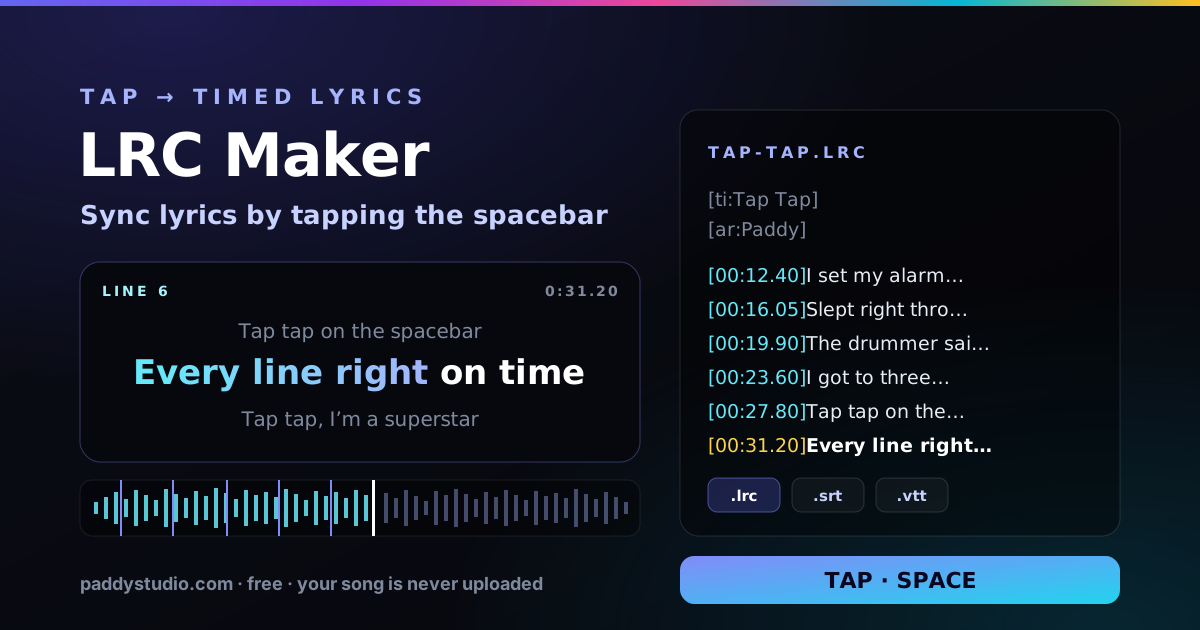
[01:23.45]. Music players use it to scroll the words in time with the song. - To make one, tap along. Load the song, paste the lyrics, and press Space each time a line starts. Ten minutes for a three-minute song, including a check.
- LRC is for music players; SRT and VTT are for video. Same timing, different files. This page exports all three, plus plain text.
- You can’t upload an LRC to Spotify. Spotify’s synced lyrics come through Musixmatch. Your file still makes that job quicker, and it’s perfect for lyric videos and YouTube captions.
- Nothing gets uploaded. The song plays from your device; lyrics and times are saved in your browser.
How to make an LRC file (or SRT) in five steps
- Load the song. Drop an MP3, WAV, M4A, FLAC or OGG onto the tool, or a finished MP4 video if you’re captioning that. Name it “Artist - Title.mp3” and the title and artist fill themselves in.
- Paste the lyrics. One sung line per line. Suno-style tags like
[Verse]and[Chorus]are skipped, so you can paste straight from your Suno lyrics box. Repeated choruses need repeating in the text, because each one is sung at a different time. - Tap. Press Space to play, then Space again the moment each highlighted line starts. Before a long instrumental, press Enter when the last line finishes so the screen clears. Fluffed one? Backspace takes it back and rewinds three seconds.
- Preview. Switch to Preview and watch the lines light up karaoke-style. Fix a line with its − / + buttons (0.1 s, or 0.01 s with Shift), type an exact time, or press ⟲ to re-tap from that line on.
- Download. Pick .lrc, .srt, .vtt or .txt. The file takes your song’s file name, which is exactly what music players look for.
Your work is saved as you go, in this browser only. Close the tab mid-song and your lyrics and times are still here tomorrow. Browsers don’t let a page keep your audio file, so just load the same song again and carry on.
LRC, SRT or VTT: which file do you need?
All three hold the same timing. The difference is who’s reading them.
| File | Use it for | One line looks like |
|---|---|---|
| .lrc | Music players that show scrolling lyrics (MusicBee, Poweramp, AIMP, Kodi, foobar2000 with a lyrics add-on), karaoke apps, and a checked reference for Musixmatch | [00:31.20]Every line right on time |
| .srt | Lyric videos and captions in CapCut, Premiere Pro, DaVinci Resolve and Final Cut, and YouTube subtitles | 00:00:31,200 --> 00:00:34,850 |
| .vtt | Web video players and YouTube. Same as SRT with a dot instead of a comma | 00:00:31.200 --> 00:00:34.850 |
| .txt | Plain lyrics for your distributor, Musixmatch or the video description | Every line right on time |
The one real difference: LRC lines only have a start time and stay up until the next line, while SRT and VTT captions also need an end time. You don’t have to tap those. Each caption ends when the next line starts, at an End line mark, or after the “longest a line stays up” limit, whichever comes first.
What’s inside an LRC file?
Plain text. Open one in Notepad and it looks like this:
[ti:Tap Tap]
[ar:Paddy]
[length:02:48]

[00:12.40]I set my alarm for the second chorus
[00:16.05]Slept right through the bridge again
[00:19.90]The drummer said just count to four, mate
[00:23.60]I got to three and made a friend
[00:27.80]
[mm:ss.xx]is minutes, seconds and hundredths of a second. Minutes can go past 59 for long DJ mixes.- A timestamp with no words, like the last line above, clears the screen. That’s what End line writes.
- ID tags such as
[ti:](title),[ar:](artist) and[al:](album) are optional, and players that don’t know them ignore them. - “Enhanced” LRC adds a time to every word,
<00:12.40>like <00:12.71>this. Few players support it. This tool times whole lines, and strips word times from files you import.
Tips for tapping lyrics in time
- Tap on the first sung syllable, not the breath before it. The singer’s inhale is not part of the lyric, no matter how dramatic it is.
- Slow it down for fast songs. At 0.75× the pitch stays the same and you get a third more time to react. Rap verses at 0.5× are genuinely relaxing. Your times are still real song time.
- Do a dry run first. Listen to the first verse once with the lyrics in front of you. The second time, you’re anticipating instead of reacting.
- Mark the gaps. Press Enter when the last line before a solo or long intro finishes, so nobody stares at “and I miss you” for 30 seconds of guitar.
- Fix everything at once if it’s all late. Nearly everyone taps 0.1 to 0.2 seconds behind. Shift all lines by −0.15 fixes that in one go.
- Split long lines for video. Around 40 characters is a comfortable caption line on a phone. If a lyric line runs longer, break it into two lines before you tap.
- Overlapping vocals? Time the lead vocal. Backing vocals in round brackets can stay on the same line, or tick Remove (ad-libs) to drop them.
Can I put synced lyrics on Spotify and Apple Music?
Yes, but not by uploading an LRC file. Neither service has an upload button for it, and any tool that says “upload this to Spotify” is being optimistic.
- Spotify gets its lyrics from Musixmatch. Claim your artist profile on Musixmatch for Artists, then add and sync your lyrics there. Once they’re approved they show up on Spotify. Your checked LRC file makes the sync step quicker, because you already know where every line lands.
- Apple Music gets lyrics from licensed lyric partners, and some distributors let you add lyrics when you upload a release. Check your distributor’s release form for a lyrics field.
- YouTube is the easy one. In YouTube Studio, open the video, go to Subtitles, add a language, then Upload file with timing and choose your .srt or .vtt. Instant lyric captions.
Getting the song onto Spotify in the first place is its own adventure. The release planner dates every step back from release day, and releasing a Suno song on Spotify walks through the upload.
Making a lyric video from an AI song
This is the bit I actually built it for. My usual route from idea to video:
- Write and tidy the words in the syllable counter, so every line sings cleanly. Its draft imports here in one click.
- Generate the track in Suno with a style from the Prompt Studio, or start from the song builder.
- Time the lyrics here and download the .srt.
- Make the visuals in Vidmuse (my Suno track to Vidmuse shot list guide covers that), or a simple reactive background with the audio visualizer.
- Drop the video and the .srt into CapCut or Premiere, import the captions, style them once, and every lyric lands on time.
The whole start-to-finish workflow is in making an AI music video with Suno and Vidmuse.
Why I built this
My first lyric video was timed by hand in a video editor: drag a caption, play, squint, drag it again. Three hours. For one song. By the second chorus I was mostly matching lyrics to the drummer’s facial expressions.
The free LRC makers I found either wanted an account, buried the tap button under ads, or had no undo, which is a bold choice for a tool whose whole job is human reflexes. So I built the one I wanted: tap along, fix the wobbly bits, watch it back, download the file. Now it takes about ten minutes, and I’ve stopped blaming the drummer. Mostly.
How it works, and what happens to your song
Your browser plays the audio file straight from your device. Each tap reads the song’s playback position at that instant, so the times are real song time even when you’re playing at 0.75×. The waveform is drawn from the same file, in the browser. Preview, the line list and every export use one shared timeline, so what you watch is what you download.
Your song is never uploaded. There’s no server involved at all. Your lyrics, times and settings are kept in your browser’s local storage so you can come back later, and the page works offline once it has loaded.
LRC maker FAQ
What is an LRC file?
An LRC file is a plain-text file of song lyrics where each line starts with a timestamp in minutes, seconds and hundredths, like [01:23.45]. Music players read it to scroll and highlight the lyrics in time with the song. It usually has the same name as the audio file, for example song.mp3 and song.lrc.
How do I make an LRC file for free?
Open a free LRC maker such as the one on this page, load the song, paste the lyrics and tap the spacebar each time a new line starts. Check the timing in preview, fix any line by nudging it, then download the .lrc file. A three-minute song takes about ten minutes including a check.
What is the difference between LRC and SRT?
LRC is made for music players: each line has only a start time and stays up until the next one. SRT is a subtitle format made for video: each line has a numbered start and end time, written as 00:01:23,450 --> 00:01:26,100. Use LRC for lyrics apps and players, and SRT or VTT for lyric videos and captions.
Can I upload an LRC file to Spotify?
No, Spotify has no LRC upload. Spotify’s synced lyrics come from Musixmatch, so artists claim their profile on Musixmatch for Artists and submit and sync the lyrics there. An LRC file you made here is still useful as a checked reference while you do it, and for music players, lyric videos and YouTube.
How do I sync lyrics to a song for a lyric video?
Time the lyrics here by tapping along to the song, then download an .srt file and import it as captions in CapCut, Premiere Pro or DaVinci Resolve. Each lyric line becomes a caption you can style and animate. For YouTube, upload the .srt or .vtt in YouTube Studio under Subtitles, choosing the option with timing.
My lyrics appear slightly late. How do I fix it?
Most people tap a little after a line starts. If every line is late by the same amount, use Shift all lines and move them 0.1 to 0.2 seconds earlier. If only one line is off, nudge it with its minus and plus buttons or type the exact time. Preview always shows the timing exactly as it will be exported.
Can I edit an existing LRC or SRT file?
Yes. Open the .lrc, .srt or .vtt file, or paste its contents into the lyrics box, and the times are imported. Load the song, check it in Preview, fix the lines that are off and export it again, in the same format or a different one.
Is my song uploaded?
No. The audio file is played directly from your device by your browser and is never sent anywhere. Your lyrics, times and settings are saved in your browser’s local storage so you can come back to them; the song itself has to be loaded again next time.
Does the LRC maker work on a phone?
Yes. On a phone or tablet use the big Tap button instead of the spacebar, and the Undo and End line buttons below it. Turn the phone sideways for a wider line list, and slow the song to 0.75× if the lines come quickly.