
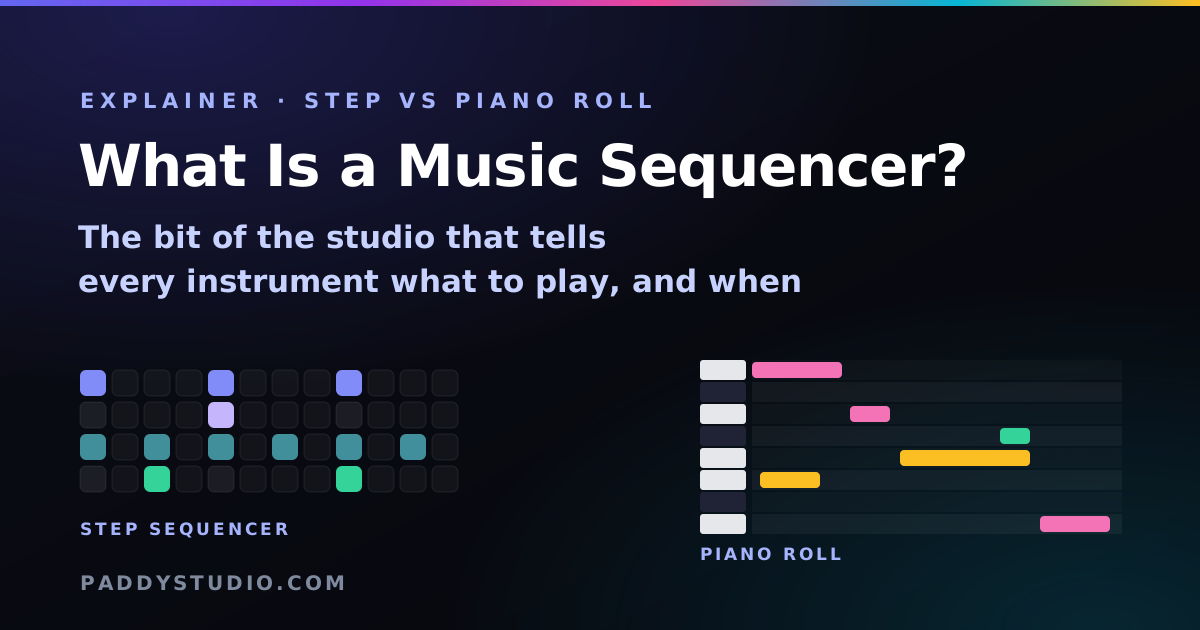
The short answer: a music sequencer is a device or program that stores musical events, such as notes, drum hits and their timing, and plays them back in order, usually in a loop. A step sequencer splits a bar into equal steps (normally 16) that you switch on or off. A piano roll lets notes be any length and start anywhere. Both control sounds rather than recording audio, which is why you can change a note after the fact.
Key takeaways
- A sequencer stores instructions, not sound. “Play C at beat 1, for half a beat.” Change the instruction, the music changes. No re-recording.
- Step sequencer = grid. Sixteen squares per bar, on or off. Fast, fun, perfect for drums and loops.
- Piano roll = timeline. Notes of any length, anywhere. Flexible, fiddlier, perfect for melodies and chords.
- MIDI is the language sequencers speak, which is why a pattern made in one app opens in another.
- Every DAW has a sequencer inside it, but you don’t need a DAW to use one: a free online music sequencer runs in a browser tab.
What a music sequencer actually does
Imagine a very patient drummer who never gets tired, never rushes, and does exactly what’s written on a sheet in front of them. That sheet is the sequence. The sequencer is the thing reading it out loud, in time, forever, until you press stop.
Each instruction in the sequence is an event: which note, when it starts, how long it lasts and how hard it’s played. Because the sequencer stores those instructions rather than a recording, you can do things a tape never could: move a note half a beat later, change the whole song into another key, swap the piano for a synth, or speed it up without anyone sounding like a chipmunk.
Step sequencers: the grid
A step sequencer chops one bar of music into equal slices called steps. Sixteen steps per bar is the standard, because in 4/4 time that makes each step a sixteenth note, counted 1 e & a, 2 e & a, 3 e & a, 4 e & a. Steps 1, 5, 9 and 13 are the four beats.
You get a grid: one row per sound, one column per step. Light a square and that sound plays on that step. Then it loops. It is the most beginner-friendly way to make music ever invented, because you can see the rhythm. Want the kick on beat 1? Square 1. Snare on 2 and 4? Squares 5 and 13. Done. You’ve made a beat.
Step sequencers shine for drums, basslines, arpeggios and repeating hooks. My drum machine is a pure drum step sequencer; the music sequencer adds bass, chords and a lead, with each row locked to a scale so you can’t play a wrong note.
Piano rolls: the timeline
A piano roll is named after the paper rolls that drove old player pianos: holes punched along a strip, each hole a note. On a screen it’s a piano keyboard running down the left, time running left to right, and notes drawn as bars. Long bar, long note. Short bar, short note. Bars can start anywhere, not just on a grid line.
That freedom is why melodies, chords and anything expressive usually end up in a piano roll. The price is more decisions per note, and a lot more ways to get lost at 2 a.m.
Step sequencer vs piano roll vs DAW
| Step sequencer | Piano roll | DAW | |
|---|---|---|---|
| What it is | A looping grid of equal steps | A timeline of notes of any length | A whole studio: sequencer, audio recording, mixer, effects |
| Best for | Drums, loops, basslines, fast ideas | Melodies, chords, expressive parts | Finishing, recording vocals, mixing |
| Learning curve | Minutes | An afternoon | Weeks, honestly |
| Timing | Locked to the grid (plus swing) | Anywhere you like | Anywhere, plus recorded audio |
| Free options | Browser sequencers and drum machines | Built into most DAWs | BandLab, GarageBand (Apple), others |
Most people who make music use all three. Sketch the groove in a step sequencer, refine the melody in a piano roll, finish everything in a DAW. If you’re picking a free tool to start with, my round-up of the best free online music makers sorts them by job.
Where MIDI fits in
MIDI (Musical Instrument Digital Interface) is the shared language sequencers have used since the early 1980s. A MIDI file doesn’t contain any sound at all, just events: “note 60 on, velocity 96”, then “note 60 off” a moment later. That’s why MIDI files are tiny, and why you can open the same file in GarageBand, FL Studio, Ableton or Logic and it plays with whatever sounds you choose.
Drums in MIDI follow a convention called General MIDI: they live on channel 10, and each drum has a fixed note number (kick 36, snare 38, closed hi-hat 42, open hi-hat 46). The Paddy sequencer exports exactly this, so your drums show up as drums wherever you open them.
MIDI vs audio in one line: MIDI is the sheet music, audio is the recording. You can edit sheet music forever. You can’t un-sing a wrong note in a recording (well, not cheaply).
A very short history of sequencers
- Player pianos and music boxes were sequencers long before electricity got involved: pins on a drum, holes in paper, all telling the instrument what to play.
- Analog step sequencers in the 1960s and 70s drove modular synths with rows of knobs, one per step. That’s where the 16-step idea comes from.
- Drum machines like Roland’s TR-808 and TR-909 put a step sequencer behind every button and quietly invented hip-hop, house and techno as we know them.
- MIDI arrived in 1983 and let any sequencer talk to any instrument.
- Software sequencers and DAWs moved it all onto computers, and now into browser tabs, which is frankly ridiculous and wonderful.
How to try a sequencer right now (free, in your browser)
- Open the online music sequencer and press play. A lo-fi starter loop plays.
- Click the 🥁 Drums tab and switch a few squares on and off. Notice the loop changes next time round.
- Click 🎹 Chords. Each row is a whole chord in key. Move one and hear the mood shift.
- Change the Key. Everything moves together. That’s the sequencer storing instructions, not sound.
- Download the MIDI and open it in your DAW, or press Open in Prompt Studio to turn your loop into a Suno prompt.
Fancy going deeper on rhythm? My guide to making a beat online walks through kick, snare, hats, swing and fills one square at a time.
Frequently asked questions
What is a music sequencer in simple terms?
A music sequencer is a tool that stores which notes or sounds to play and when, then plays them back in time, usually in a loop. It controls instruments rather than recording audio, so you can edit any note afterwards.
What is the difference between a step sequencer and a piano roll?
A step sequencer is a grid of equal steps, normally 16 per bar, where each square is on or off. A piano roll is a timeline with a keyboard down the side where notes can be any length and start at any point. Step sequencers are faster for drums and loops; piano rolls are better for expressive melodies and chords.
Is a sequencer the same as a DAW?
No. A DAW (digital audio workstation) is a complete studio that includes a sequencer, plus audio recording, mixing and effects. A sequencer can be a standalone hardware box, a browser tool or one part of a DAW.
What is a MIDI sequencer?
A MIDI sequencer records and plays MIDI events: note on and note off messages with pitch and velocity, plus controls such as the sustain pedal. Because MIDI contains no audio, a MIDI sequence can play any instrument and can be moved between apps as a .mid file.
Why do step sequencers have 16 steps?
In 4/4 time, a bar has four beats and each beat splits into four sixteenth notes, so 16 steps gives one bar of sixteenth notes. That resolution is fine enough for most drum and bass patterns, and it is what classic drum machines such as the Roland TR-808 used.
Can I use a music sequencer online for free?
Yes. Browser-based sequencers run without installing anything. The Paddy online music sequencer is free with no account, has drums, bass, chords and lead parts, and exports WAV and MIDI.
Do professional producers still use step sequencers?
Yes, constantly, especially for drums, hi-hat patterns, basslines and arpeggios in electronic music, hip-hop and pop. Many producers program drums in a step sequencer and write melodies in a piano roll within the same project.
Try a sequencer in the next ten seconds
The free Paddy music sequencer has drums, bass, chords and a lead on one grid, locked to your key. Press play, tap squares, export MIDI or turn it into a Suno prompt.
Open the music sequencer →