
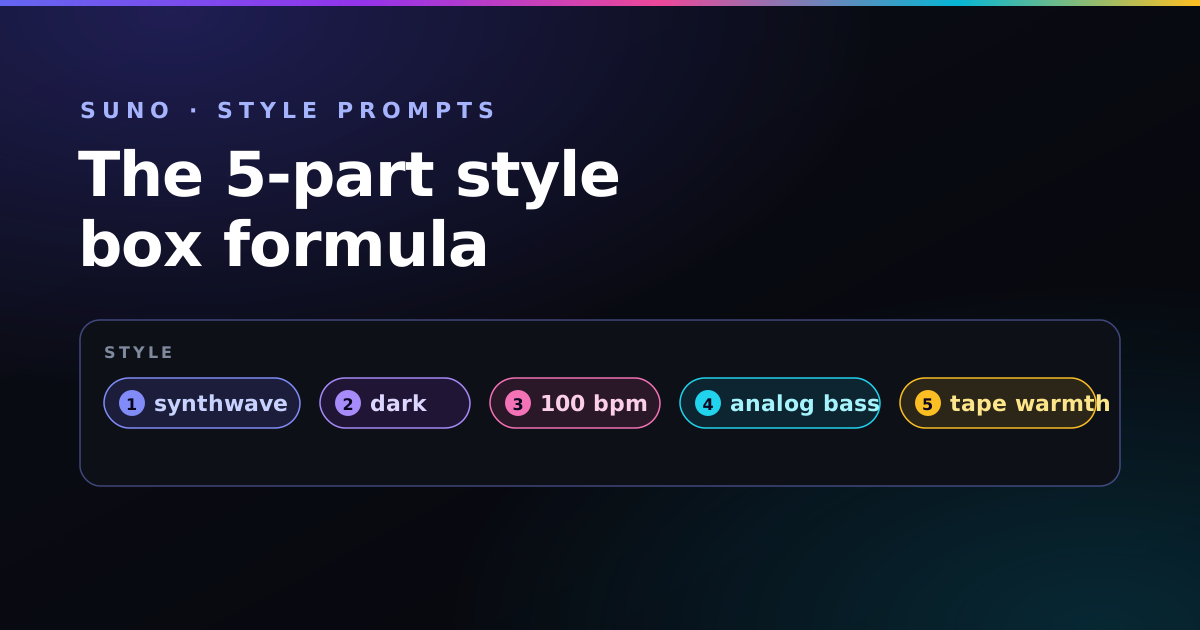
The style box in Suno is small, but it is the single most important field you fill in. It decides the genre, the energy, the instruments, and the voice. Get it right and the track feels deliberate. Throw words at it and you get something that is technically music but never quite what you imagined.
The good news: a strong Suno prompt is not magic, it is structure. Once you learn the order Suno reads tags in, you can build a reliable prompt for any genre in under a minute.
Key takeaways
- Write the style box as short, comma-separated tags — never full sentences.
- Order matters: genre → sub-genre & mood → tempo → instruments → production.
- The first three tags carry most of the stylistic weight, so spend them wisely.
- Describe a famous artist's sound, never their name.
Style box vs. lyrics box: keep them separate
Suno has two inputs that do very different jobs. The style box describes how the music should sound. The lyrics box holds the actual words to be sung, along with structure tags like [Verse] and [Chorus].
The most common beginner slip is mixing the two — dropping "emotional piano ballad" into the lyrics box, where Suno may try to literally sing the phrase. Keep your sound description in the style box and your words in the lyrics box, and half of all weird results disappear.
The five-part style formula
Think of the style box as five slots, filled in this order. You do not need all five every time, but the sequence should stay the same.
1. Core genre (the foundation)
Start with the single macro-genre that anchors everything: synthwave, trap, indie folk, drill, bossa nova. This is the most important tag in the whole prompt — it sets the rhythmic feel and instrumentation Suno reaches for first.
2. Sub-genre & mood
Now sharpen it. Add a sub-style and an emotional adjective: dark, dreamy, aggressive, nostalgic, uplifting. "Synthwave" is broad; "dark dreamy synthwave" already has a personality.
3. Tempo
State a BPM. Suno responds well to explicit numbers like 92 bpm or 140 bpm, and tempo dramatically changes a song's feel. If you are unsure what fits your genre, our BPM cheat-sheet by genre has a starting point for each style.
4. Instruments
Name two or three signature instruments — not ten. analog bass, rhodes piano, 808 drums, fingerpicked acoustic guitar. A short, specific list keeps the mix focused; a long one muddies it.
5. Production & space
Finish with the texture: vinyl crackle, wide stereo, gated reverb, warm tape saturation, clear high frequencies. These tags fight the "boxy" low-fidelity sound and make the output feel mixed rather than raw.
Dark dreamy synthwave, 100 bpm, analog bass, gated reverb snare, warm tape saturation, wide stereo
The keyword-order rule that changes everything
Here is the detail most guides skip. Suno does not treat every tag equally — it weights the earliest words most heavily. Your first three tags carry the majority of the stylistic decision.
That means trap, dark, 140 bpm, piano and piano, dark, trap, 140 bpm can produce noticeably different songs. Lead with instruments and you often get a loose, meandering track because Suno never locked onto a genre. Lead with the genre and everything that follows arranges itself around it.
Rule of thumb: if a tag is non-negotiable for your vision, move it toward the front. The earlier it sits, the louder it speaks.
Describe the artist, never name them
Typing "in the style of Billie Eilish" will get filtered — Suno blocks named-artist and brand tags. The fix is to describe the sonic DNA instead. Want that Daft Punk feel? Skip the name and write what it actually is:
French house, 124 bpm, analog talkbox vocals, filtered disco guitar, four-on-the-floor live drums, sidechain pump, stereo master
This is more reliable than a name anyway, because you are telling Suno the exact ingredients rather than hoping it remembers an artist.
Three copy-ready starting points
Lofi hip-hop, 74 bpm, dusty rhodes piano, soft boom-bap drums, vinyl crackle, warm upright bass, mellow tape hiss
Dark trap, 140 bpm, booming 808 bass, crisp hi-hat rolls, orchestral strings, hard-hitting snare, wide cinematic reverb
Indie folk, 96 bpm, fingerpicked acoustic guitar, warm male vocals, soft brushed drums, gentle harmonies, intimate room mic
Use one as a template and swap the tags slot by slot. Because the structure is fixed, your edits stay predictable. If you also want lyrics that match, the song builder writes the style prompt and a lyric sheet in the same key and tempo.
Frequently asked questions
What goes in the style box versus the lyrics box?
The style box describes the sound — genre, mood, tempo, instruments, vocal type, and production. The lyrics box holds the words to be sung plus bracketed structure tags like [Verse] and [Chorus]. Keep descriptive sound words out of the lyrics box or Suno may try to sing them.
Does keyword order really matter?
Yes. Suno weights the earliest tags most heavily, so lead with the core genre, then sub-genre and mood, then tempo, then instruments, and finish with production details. Instruments before the genre tend to produce a loose, unfocused track.
Should I use tags or full sentences?
Use short comma-separated tags. "Dark synthwave, 100 bpm, analog bass, gated reverb" carries far more usable signal than a descriptive sentence and avoids wasting space on filler like "a song that sounds like."
Why won't Suno copy a famous artist's name?
Suno blocks named-artist and brand tags for copyright reasons. Describe the sonic DNA instead: for a Daft Punk feel, use "french house, 124 bpm, analog talkbox vocals, filtered disco guitar, four-on-the-floor drums."
Build your Suno prompt visually
The Suno Profiler in the free Paddy Prompt Studio lays out all five slots as clickable tags — pick a genre, mood, tempo, and instruments, and it assembles the prompt in the right order for you.
Open the Suno Profiler →